
Credible Jobs
Credible TechnologiesBusiness
3.333.00 Reviews
- Version
- 2.0.6
- Installs
- 10.00K
- Age Rating
- Teen
Screenshots

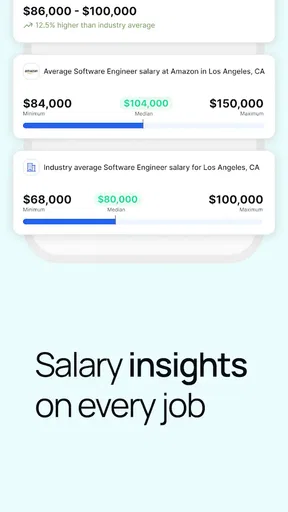
Our Review of Credible Jobs
 Analysis by Appyee
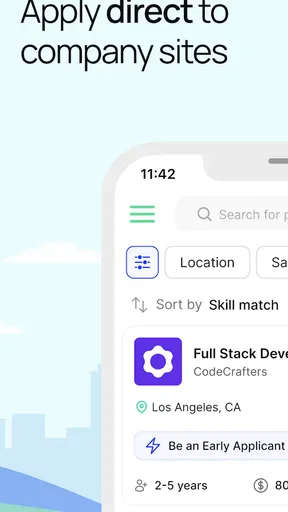
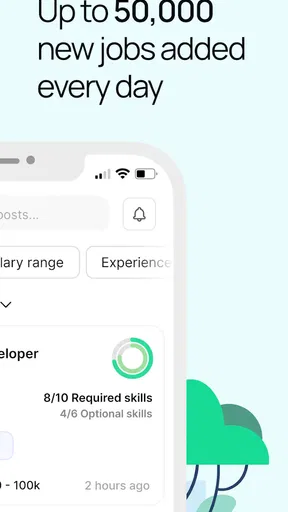
Job searching is easy to start and difficult to maintain. I have tried Credible Jobs with that reality in mind: not as a one-time tool for browsing vacancies, but as something that has to earn a place in a weekly routine. Its focus is clear. It brings together job listings, an AI-assisted application flow, and resume tools in one business app from Credible Technologies. That combination makes a strong first impression, especially when I want to move from “I should apply for something” to actually preparing an application.
The app is free to install, although some individual in-app purchases range from $14.99 to $59.99. It is rated for Teen users and runs on Android 7.0 or later. The current version is 2.0.6, and the app was released on August 15, 2024. Those details matter because this is a relatively young service: I approach it as a developing job-search companion rather than a fully mature replacement for every established employment platform.
What makes the first week appealing
During the first few sessions, the most useful part of Credible Jobs is the way it connects several steps that are usually scattered across different places. A typical search can involve a listings website, a document editor, a resume template, notes about applications, and a separate reminder system. Having job discovery, AI Apply, and smart resume features presented as parts of one experience reduces some of that switching.
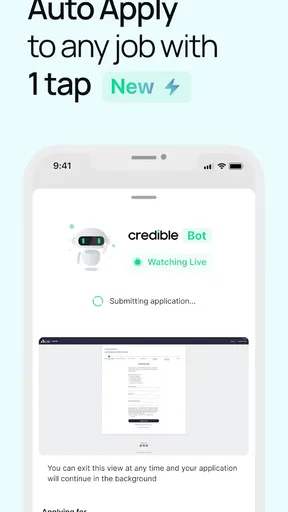
I especially like the app for the moment when a job seeker has found a promising role but is stuck before applying. The AI Apply idea addresses that hesitation directly. Instead of treating a listing as the end of the search, the app encourages the user to continue into the application process. That is a meaningful difference from a basic job board, where it is easy to browse for an hour and complete nothing.
The first-week appeal also comes from the low commitment. Since the app is free to install, I can test its workflow without immediately paying for access. That makes it suitable for someone who is changing careers, returning to work, or simply checking whether a different job-search routine feels more productive. The Teen rating also makes the audience broad enough for older students and early-career users, although the practical value will depend on the kind of work being sought.
My advice is to begin with a specific goal rather than opening the app casually. For example, I would decide to find roles in one field, prepare one adaptable resume, and submit a small number of thoughtful applications. That approach makes it easier to judge whether the app is saving time or merely giving me another place to scroll.
Where the combined workflow helps
The strongest practical use case is a focused application session. I can review a listing, compare its requirements with my existing experience, adjust my resume, and use the application assistance as a prompt to move forward. Even when the AI does not remove every manual step, it can help break the psychological barrier between searching and submitting.
A second useful scenario is the weekly reset. On a Sunday evening, I might review new opportunities, remove roles that no longer fit, update the resume language for the most relevant positions, and decide which applications deserve attention during the week. The value here is not a single clever recommendation. It is the possibility of turning a vague search into a repeatable sequence.
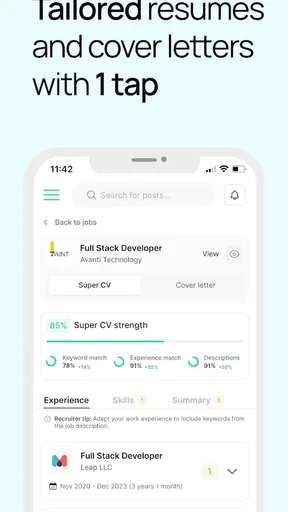
There is also a less obvious benefit for users with several versions of their work history. A person applying to customer support, administration, and sales roles should not send exactly the same resume every time. Smart resume tools are most useful when they encourage that distinction. I would still check every suggested change myself, but the feature can make tailoring feel more manageable than starting from a blank document for each application.
What I would check before trusting the assistance
AI support is helpful only when the applicant remains the editor. I would inspect job titles, dates, skills, and descriptions carefully before sending anything. A polished sentence is not worth much if it exaggerates experience or changes the meaning of a previous role. Credible Jobs can support preparation, but it should not be treated as an automatic substitute for judgment.
I would also compare the listing details with the original employer’s information before sharing personal details or completing an application. This is not a criticism unique to this app; it is a sensible habit for every job-search service. The app’s promise is convenience, while the user still has responsibility for accuracy, suitability, and privacy decisions.
That balance is important during the first week. The app feels most useful when I use its tools to speed up decisions I have already considered. It feels less useful if I expect a button to produce a perfect resume or a guaranteed application outcome.
Does it keep earning attention after the novelty fades?
I find that an app earns a lasting place less through novelty than through how well it fits a real routine. In this section, I’d look at the small signals that can show whether Credible Jobs is helping me make considered progress, rather than simply encouraging more browsing. That also sets up the practical question of what might make continued use feel like work.
Month-to-month value depends on a real search rhythm
The first impression of an integrated job app can be exciting, but lasting value comes from repetition. After the novelty of AI Apply and smart resumes fades, I would keep Credible Jobs installed only if it helps me perform the same useful actions consistently: find relevant openings, prepare better materials, and remember what needs to happen next.
For an active job seeker, that recurring value is plausible. Someone applying every week may appreciate having the search and preparation stages close together. The app can become a working station rather than another source of general career advice. That distinction matters because job seekers usually do not need more motivation to browse; they need a process that helps them make progress.
For a person who is only curious about the market, the value is less durable. Once I know the types of roles available, I may not need daily access. In that situation, a traditional employment website with a strong search experience might be enough, especially if I already have a reliable resume editor and a simple spreadsheet for tracking applications.
The app also makes more sense during periods of change. A new graduate, someone relocating, or a worker trying to move into another industry may benefit from repeatedly tailoring materials. By contrast, a specialist who already has a strong professional network and receives opportunities through direct contacts may find the all-in-one workflow less important.
A practical routine that avoids endless browsing
I would use the app in short, deliberate sessions rather than leaving it open throughout the day. One session could be for discovery, another for resume adjustments, and a final one for reviewing applications before submission. Separating those tasks prevents the common job-search problem of confusing activity with progress.
A useful personal rule is to save fewer opportunities and evaluate them more carefully. If I collect every vaguely suitable listing, the app becomes a storage box for unfinished intentions. If I choose only roles that match my location, experience, schedule, and salary expectations, the AI and resume tools have a clearer purpose.
I would also keep a separate record of applications, even if the app helps with the process. A simple note containing the employer, role, date, customized resume version, and follow-up plan can prevent confusion later. This is one of the less obvious trade-offs: an integrated app reduces switching, but relying on one place for memory can make the search harder to reconstruct if my habits change.
Free entry, paid decisions
The free installation is a genuine advantage for testing the workflow. I can decide whether the listings and application tools fit my needs before considering paid features. However, the presence of purchases from $14.99 to $59.99 per item means I would not assume that every useful capability is included without cost.
My approach would be conservative. I would first use the free experience long enough to identify a specific limitation, then decide whether a paid item solves that limitation in a way I will use repeatedly. Paying for a resume-related feature may make sense during an active career transition, but it is harder to justify if I am only browsing occasionally.
This pricing structure also changes how I judge long-term value. The question is not simply whether a paid option sounds helpful. It is whether it saves enough time or improves enough applications to justify its cost for my particular search. A person sending many carefully tailored applications may reach that point sooner than someone applying to only one or two roles.
Maintenance, friction, and the parts that may wear me down
Even a useful workflow can become tiring when it asks me to repeat the same checks across many applications. I’d pay attention to where the process still needs my time and judgment, and whether that effort feels proportionate to the roles I’m pursuing. Those everyday trade-offs are a good way to assess whether the app remains helpful beyond an initial burst of interest.
The maintenance burden is still partly mine
No job app can maintain a truthful professional profile without regular input. I would need to keep my resume current, remove outdated details, check whether skills still describe my abilities, and adapt the document when my target roles change. Credible Jobs can make those tasks more convenient, but it does not eliminate them.
This is where the smart resume concept needs realistic expectations. Automated suggestions can improve clarity or help surface relevant experience, yet they may also encourage similar wording across many applications. I would use the tool as a second pair of eyes, not as my personal voice. The best resume still needs concrete evidence of what I have done and why it matters to the role.
Job listings also require maintenance from the user’s side. A role that looked suitable last week may no longer fit after I read its requirements carefully. I would review saved opportunities regularly and close the loop on applications instead of allowing them to accumulate. That small habit keeps the app from becoming visually busy and emotionally tiring.
Where application fatigue can appear
The biggest source of fatigue is likely repetition. Searching, comparing, tailoring, checking, and submitting can feel mechanical when repeated many times. AI Apply may reduce some typing or decision-making, but it cannot make every employer’s process equally simple. If an application still requires detailed answers or additional steps, I would expect to do that work outside the app’s streamlined flow.
Another source of fatigue is over-customization. Tailoring a resume is valuable, but rewriting every line for every listing can consume more time than the opportunity deserves. I would keep a strong master resume, create a few role-specific versions, and make targeted changes only when they improve the match. This is a concrete way to preserve the app’s usefulness without letting it dominate the search.
There is also a motivational risk. A polished AI-assisted application can feel finished before I have checked whether the role is genuinely suitable. I would pause before submission and ask three simple questions: do I meet the essential requirements, can I explain my relevant experience honestly, and is this an employer I actually want to contact? That pause protects against efficient but unfocused applying.
How it compares with familiar alternatives
Compared with a conventional job board, Credible Jobs is more appealing when the main problem is moving from discovery to application. A standard listings service may offer broader browsing or a familiar network, but it often leaves resume preparation and application organization to separate tools. Credible Jobs’ advantage is the tighter connection between those stages.
Compared with a dedicated resume editor, this app is more useful for people who want job discovery and document preparation in one place. A specialist editor may offer deeper formatting control, while Credible Jobs is better suited to users who value speed and an integrated workflow. I would choose the specialist tool when presentation details are central, such as for design-heavy portfolios or highly customized professional documents.
Compared with applying directly through company career pages, the app offers convenience during the search phase. Direct applications can still be preferable when an employer provides detailed role information, asks specific screening questions, or clearly manages applications through its own system. I would treat Credible Jobs as a starting point and preparation aid, not as a reason to ignore the employer’s official process.
That comparison reveals the app’s proper place. It is not automatically the best tool for every part of a job hunt. Its strongest role is as a bridge between finding a credible opportunity and preparing a focused application without constantly changing tools.
My long-term verdict after the useful novelty wears off
Credible Jobs earns lasting space most easily for an active applicant who wants structure. The combination of real job listings, AI Apply, and smart resume support gives it a practical identity beyond simple vacancy browsing. With an average rating of 3.3 from over 90 ratings and more than 30 written reviews, the public response looks mixed rather than universally enthusiastic. I read that as a reason to test the workflow personally, not as a reason to dismiss it.
The app’s audience has grown to over 10 thousand installs, which gives it enough presence to be worth considering while still reminding me that it is a developing product. I would keep expectations measured. The current version may improve the experience, but a job-search app must prove its value through repeated, dependable use rather than through a promising first session.
I would recommend it to someone who is tired of keeping listings, resumes, and application preparation in separate places. It is also worth trying if the hardest part of the search is getting started or tailoring materials without losing momentum. The free installation makes that experiment relatively straightforward, provided I pay attention to which capabilities require an in-app purchase.
I would skip it, or use it only alongside other tools, if I need a highly specialized resume editor, depend heavily on direct employer applications, or already have a disciplined system that works well. People who dislike reviewing AI-generated wording should also be cautious. The convenience is real, but it does not remove the need to proofread, personalize, and verify.
My final view is positive but selective: Credible Jobs is most valuable as a repeatable application routine, not as a magic job-search shortcut. If I use it with a clear target, a maintained resume, and a habit of checking every suggestion, it can justify a regular place on my phone. If I only browse without applying or expect automation to handle the important decisions, its appeal will probably fade quickly.
That is ultimately the test I would give any employment app. After the first week, does it help me complete better applications with less scattered effort? For the right user, Credible Jobs has a credible answer. Its lasting value comes from disciplined use, sensible expectations, and knowing when its integrated workflow is genuinely better than the familiar alternatives.
Verdict
Strengths of Credible Jobs
- Simple interface makes browsing job listings quick and easy.
- Useful filters help narrow opportunities by role, location, and experience.
- Job descriptions provide key details before you apply.
- Convenient access to new listings from a mobile device.
- Can help users discover remote and flexible work opportunities.
Limitations of Credible Jobs
- Listing quality may vary depending on the employer or source.
- Some applications redirect you to external websites.
- Competition can be high for popular remote positions.
- Not every listing may be available in all countries or regions.
- Users should verify employers and offers to avoid potential scams.
Similar Picks in This Category
View All
LinkedIn: Community & Network
LinkedIn3.8

Zoom Workplace
zoom.com4.1

Microsoft Teams
Microsoft Corporation4.6

Meta Business Suite
Meta Platforms, Inc.4.6

Webex Meetings
Cisco Systems, Inc.4.5

TeamViewer Remote Control
TeamViewer4.4
Frequently Asked Questions
What is Credible Jobs, and how does it work?
Credible Jobs is a job-search platform designed to help users discover employment opportunities and connect with potential employers. After creating a profile, you can browse available listings, review job descriptions, check requirements, and apply to suitable positions. The experience may vary depending on your location, profession, and the number of employers actively using the platform.
Is Credible Jobs free to download and use?
The application may be free to download, although some features, services, or optional tools could depend on the platform’s current policies. Before signing up or submitting payment information, review the pricing details, terms of service, and any subscription conditions shown in the app. Users should also verify whether employers ever request additional fees during the hiring process.
Can I trust the job listings and employers on Credible Jobs?
Credible Jobs can make job searching more convenient, but users should still evaluate every listing carefully. Check the employer’s identity, research the company independently, and look for clear information about responsibilities, salary, location, and recruitment steps. Be cautious of requests for money, banking credentials, sensitive documents, or unusually attractive offers, as no job platform can eliminate every fraudulent listing.
What information do I need to provide to apply for jobs?
You will generally need to create a profile and provide basic details such as your name, contact information, work history, education, skills, and possibly a résumé. Some applications may request additional documents or answers to screening questions. Share only information that is relevant and necessary, and avoid uploading highly sensitive personal or financial data unless you have verified the employer and understand why it is required.
Is Credible Jobs suitable for finding remote, part-time, or local work?
The types of opportunities available through Credible Jobs depend on the listings published in your region and the categories supported by the service. You may find remote, full-time, part-time, freelance, or local positions, but availability can change frequently. Use filters and read each listing carefully to confirm the work arrangement, schedule, location, compensation, and application requirements before applying.
